

One of the easiest ways to invite people to your new group is with GroupSpot’s custom PDF invites. They are perfect for attaching to an email or printing for in-person meetings. Each PDF includes your group’s name and avatar at the top, simple step by step instructions for joining, a QR code to scan, an invite code for quick access, and a short overview of what members can expect on GroupSpot.
Here is how to access your PDF invite:
1. Open your group menu and select Invite.
2. On the next screen, select PDF Flyer.
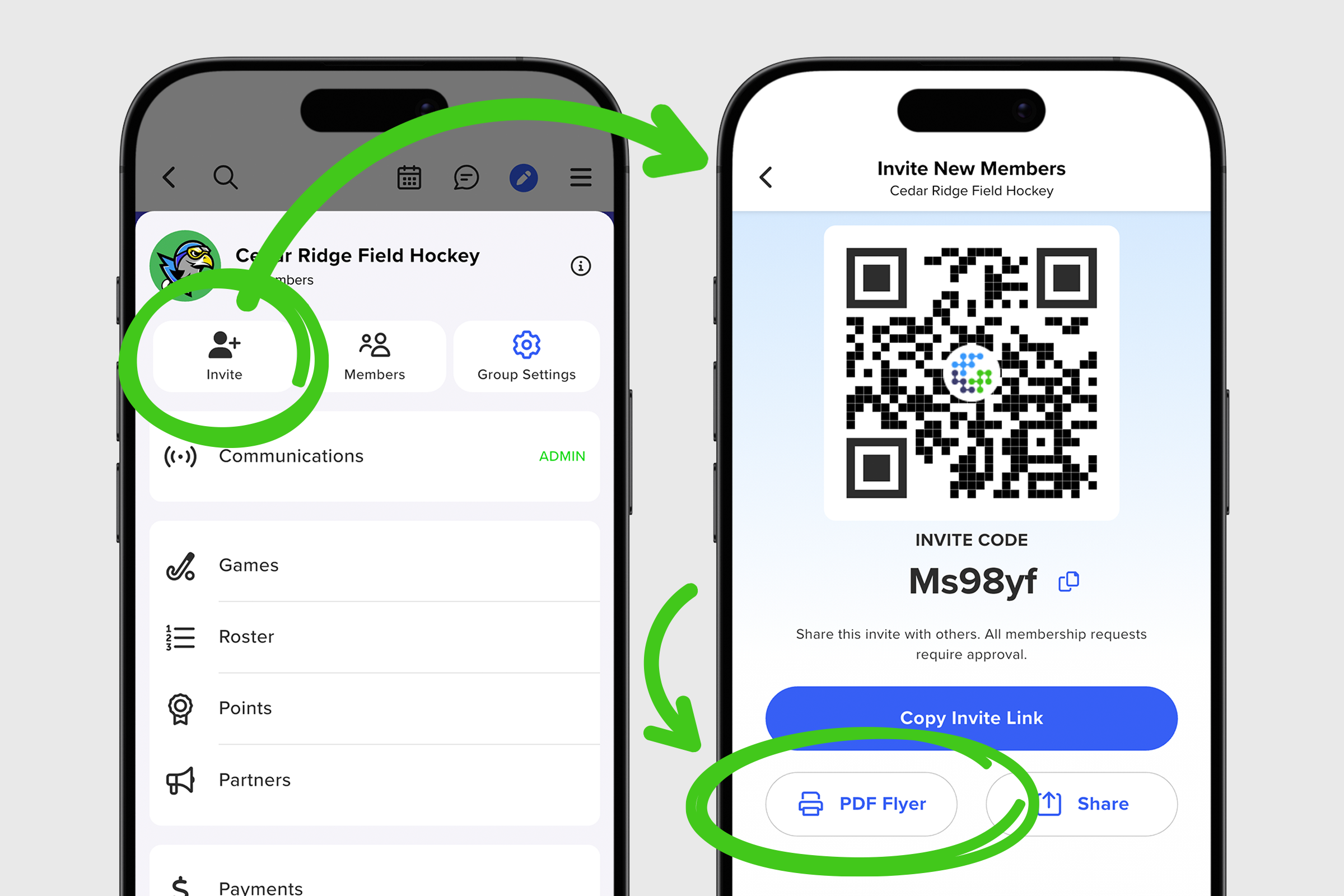
3. On the web, tapping the PDF Flyer option saves the PDF to your downloads folder.
4. On mobile, tapping the PDF Flyer option opens the attachment and you can hit the share button to print, text, email, or copy the file.
5. Emails with the PDF Flyer attachment can be sent from web or mobile very easily.
6. Printing the flyer is just as easy and works great as a handout or even projecting on an overhead with a large audience.
With built-in joining instructions, a QR code to scan, an invite code for quick access, and a clear preview of your group, this PDF is designed to do the heavy lifting for you. GroupSpot streamlines the invite process and reduces the administrative work with a simple, ready to share solution.


